Secure AI
Monetizing AI agent traffic: Write your first Monetization Gateway rule


Rohin Lohe, Will Papper
Cloudflare
0:03My name is Dan Carter. I'm an engineering director here at Cloudflare, and I lead the engineering team behind Cloudflare OS. And with me presenting is going to be Philip Jones, our principal product manager. Before we get into the demo, I wanted to very briefly go over our journey through some of the problems that may sound familiar to many of you. As we all know, AI... just isn't useful when it's not connected to all of the systems that your company uses internally.
0:35And once we unleashed a bunch of these agents on our organizations, the only thing that people wanted were a number of these API keys so they could create their super apps. And that's keys, plural, to production systems. As most of you know, the issue with API keys... they're broad, they're long-lived, they're hard to scope, hard to share, hard to audit. So the first version of Cloudflare OS that we leaned on was a stack that probably looks familiar to a lot of you. It was an agent workspace in the browser behind Cloudflare Access. It had an MCP server portal, which sat in front of our internal systems. Tokens work the way they do in most MCP setups. You click authorize once. You click authorize once.
1:24response, which you click on our portal. It covers the integration that you need to do your job. We stored the token on our side, which is tied to you. The agent never held it, which was a great upgrade from the standard and traditional service token setup. But every workspace that you opened got wired directly to that token, which meant that any agent in any chat you could put to work on anything that you personally have access to. And your agent gets everything that you have. This created a huge problem for organization. If you think about people like system administrators, VPs, or anyone who has some type of elevated access above what a normal employee would get at the company.
2:09And once the entire company was on it, we ended up with what I'll characterize as a couple of problems. The first was that there's no way... to say, just give the agent access to this, where this is the, because the token is you, you couldn't just give access to just this account or just this individual resource. And second, we hit a problem with sharing. Once people created these workspaces that were really useful and they began sharing them with their coworkers, we didn't have a way to take these artifacts or these outputs of their work and be able to see does the person that you shared these artifacts with actually have access to view the thing that you used in order to generate with everything that you were vibing with your agent so we rebuilt in august and we open sourced it and as a refresher cloudflare os runs in your cloudflare account and i like to say it up into three things. Agents that know your company.
3:16With Cloudflare OS you get a shared set of skills and in context that many people and employees at the company may have already invested in and you can bring them right into the platform. You get apps and tools that anyone can build, no terminal required which lets you turn these conversations into a document, into an app, into a workflow that you can run everywhere. It's built for sharing. People can use these created tools to keep improving on them together collaboratively. The agent or the workspace's code runs at a sandbox with no internet access by default. Every call to your model goes to one of your systems and it goes through either our AI gateway, which handles every model call from any provider and allows you to choose the right model for the job and also allows you to track the costs appropriately.
4:12or it goes to our gatekeepers, which handle every call to your internal systems.
4:20So what is the gatekeeper? A gatekeeper is a small worker, one per service, that sits between the agent and your internal systems. So let's go back to that token that we were talking about earlier.
4:34You still connect to your account once over OAuth, but the token goes to the gatekeeper and stays there and the token is narrower too in the example that i have up on the slide you can see that the gatekeeper is connecting specifically to an individual folder and an individual account and the scope of the token that was created reflects that granular access every time a request is made the gatekeeper checks it it uses that token and it records whatever was read or observed as we like to refer to it on top of that the team that owns the service can add their own rules via the platform that users can't switch off. So think about things like masking contact details, rate limiting individual services, requiring approval before anything is written.
5:20This is what empowers agents to run on their own without you having to wonder what happens if the LLM misunderstands a request. When a colleague or a co-worker opens something you built, Each gatekeeper uses their own connection to check the data that the coworker already had access to view the data. If you think about something like MCP, you might have given read access to something like a Google Drive. But what if you use something that was very sensitive, that had very sensitive information? Think like a quarterly earnings report. And you use that to produce a new document, a new app, a new... workflow. In your gatekeeper, you can define resources as sensitive. And once the agent reads something that's flagged as sensitive, it can't fetch any web pages, it can't push any code, and every write requires human approval.
6:17We know that many companies have invested heavily into the MCP ecosystem, so all of that already works with Cloudflare OS through our MCP gateway. And when you connect them, they respect any annotations that you make. have already set up but with that enough talking i'm going to pass it off to my colleague philip to walk you through cloudflare os thank you
6:51hey everyone uh time for a quick demo
6:57uh and as a fun aside uh something i think is fun is that our our slides themselves we made in cloudfire west so we're you know uh you know a little little meta demo in and of itself that you already saw but but anyways my name is philip and i'm a product manager but today i'm not a product manager not for this demo for this demo i'm a customer success manager and if you don't know anything about that role it's a it's a post sales role right so there's an account team an account executive that work with the customer they sell some product, and then the customer signs a contract. And then that's where I come in as a customer success manager. And my job really is to make sure that people have a good experience with the product, that they're engaging with it, and that at the end of the day, when 12 months rolls around and it's time for the customer to sign a contract again, they're going to renew.
7:51And in fact, renewing is part of how I get paid. But I don't just work with one customer. I work with 50 customers and it's incredibly challenging to keep track of them, right? I have to know, you know, which ones have support tickets. I have to know which ones are using the product versus who paid and are not consuming it and, you know, might leave next year. And if I'm being honest, if I'm really being honest in this moment as a customer success manager, sometimes the first time that I'm actually understanding whether they're going to renew or not is when I set a. calendar invite for a month before it's time to sign a contract and I go talk to them and it's too late. And so I want to use Cloudflare OS. I mean, people are talking about AI these days. Can I use Cloudflare OS to get a better sense of my customers and maybe even use an agent to automate part of that so I can stay on top of my work?
8:41So this is Cloudflare OS. This is a workspace, but I'm going to go back to the home here and I'm going to start with a question. That's pretty common for someone in my role. I'm going to say, what is the renewal status for in a tech? Which, you know, it's one of my favorite customers.
9:07And what you'll notice is it actually relates to what Dan talked about, is that each of these agent workspaces start off with access to nothing, right? They're totally sandboxed, but yet our agent has enough. context to know exactly what resources that you need to accomplish the job. And so it's asking me here for our CRM and our support tool. And so I'll set it up. But one of the things that I'll point to, and I'll sort of call back to what Dan was talking about, is that it's not getting my entire access just because I decide to attach a CRM. I can give it my list of accounts that I need to answer this question. I can give it a specific account. And when I look here, I could even define what the agent will have access to. So I'm okay to give it product usage, but maybe I don't want it to be sending emails when I'm asleep, right? And so I can give that access.
9:54And then I'll do the same for our support tool. And then it's, you know, it's going to use the agent and those data sources to help me understand what the renewal status is. And let's, hopefully, hopefully it doesn't take too long. Now let's look at that. Well, who would have thought? The renewal is coming up in 27 days and my prized customer is evaluating our competition, Hyperion Analytics. Hopefully no one here works there because it's our big competition. And so that's interesting. And one of the things that I'm thinking is, am I just doing a bad job or maybe other people are also struggling with this?
10:43So I'm going to check to see one of my calls. week's customers here see if this works
11:04interesting okay and i think this is an important thing to know too right so just because i gave we've we've chosen someone at our company has chosen to integrate our crm in our support tooling and I've chosen to attach it doesn't mean that I get access to everyone's data, right? It starts user-scoped and I have access to what I have access to, but nothing more. So, okay, I can't check my colleague's stuff to see how I'm comparing, but I do want to create this dashboard that it's talking about.
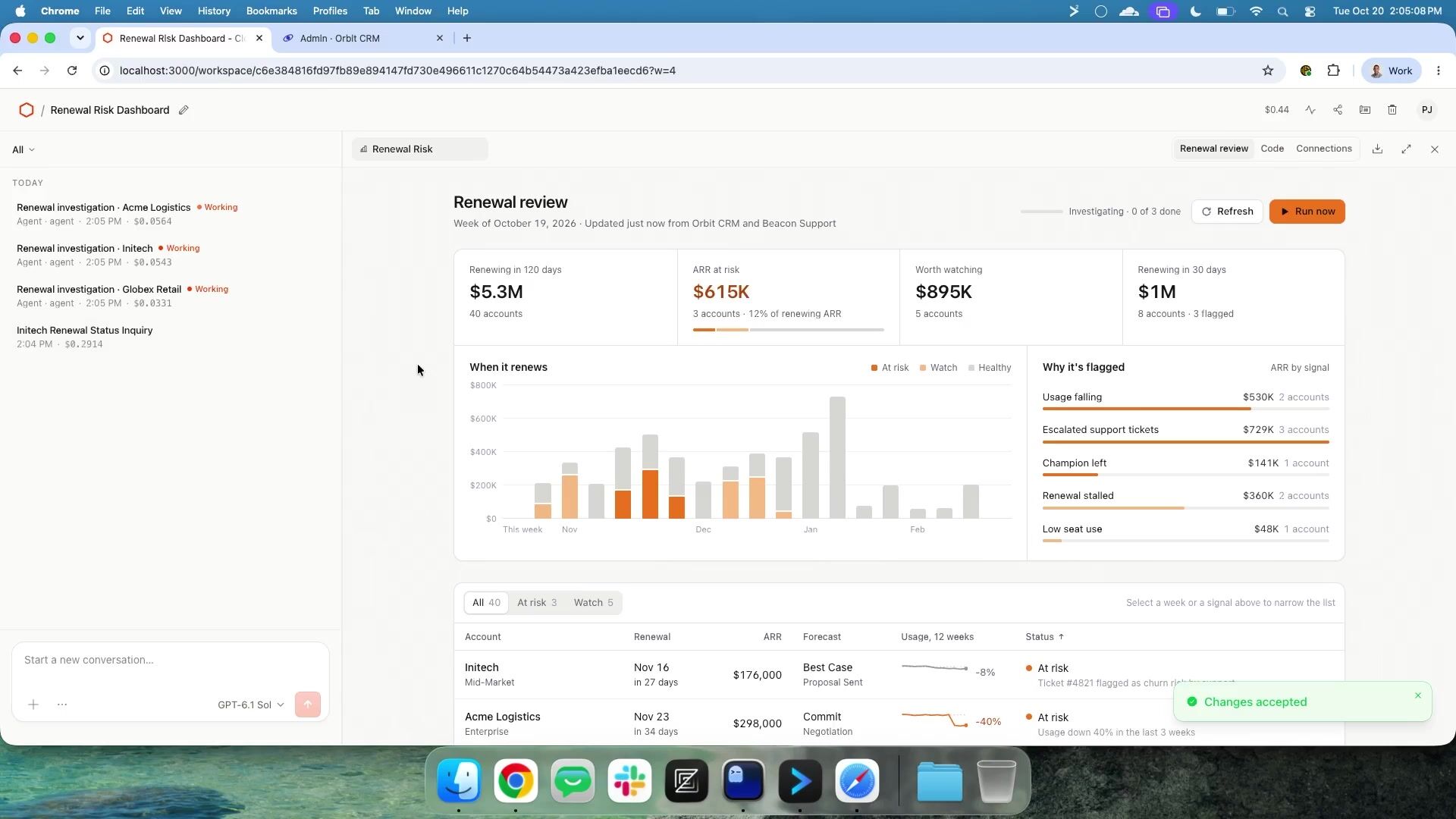
11:40And part of cloud... SoftwareOS, as Dan mentioned, is not only answering these questions, but it's helping people build their own personal tools and their own personal views of this data. And so you might say to yourself, how was I able to get this dashboard that quickly? Am I cheating? Do I have access to some secret AI model that you don't know about? And the answer is unfortunately no. But the reality is that as a customer success manager, it turns out I'm not the only one in the company right and i don't know if any of you have seen in your organization but it turns out that like everyone's kind of building the same thing within a role right and one of the cool things about cloudflare os is that once someone builds something once and they do a good job of it we can then choose to surface that as a blueprint so that way the next customer success manager who comes along like myself who's you know a little bit behind on the time sometimes uh when i want to create a dashboard I get the state-of-the-art thing.
12:40I get the best thing that someone else in the company used that someone created. And I don't have to spend like $100 like Vibe coding my own dashboard, right? So if we look here, I can refresh it. It has access to the same data that my agent had access to in that same scope manner. When I built this, the agent was able to take my specific resource capability grants and move them. to the application. So both are live. And this is, I think this is solid. I mean, I'm able to see, you know, in the tech, the customer I care about is at risk. You know, you hate to see it. And if I look here, this actually is giving me some information from our support tooling, but I don't really want to look at all this, right? I mean, this depends on me coming in here and like reading the support tickets and trying to find out why people are at risk.
13:28And I don't really want to do that. And so what I'm going to do is I'm going to give this piece of software that I built. the ability to create its own agents. So I'll give it a name. And you can see here that I'm able to give it access to these bindings in a scoped manner to have access to the same things that I as a human would have. And I can keep it only to what it's needed to do the job. And so I'm going to create this here. I'll go back here and I'm going to say, hey, every morning at 8 a.m., please look. at renewals with an agent to help me understand for at-risk category.
14:15And then what this will do is this will equip the software that I've built with the capability to, let's see, every day. For
14:30I don't need to be more clear, but this will equip the software that I built with the capability to itself, fire off agents based on events or based on a schedule. And so there you have it. I mean, we're not going to wait here until 8 a.m., but I can choose to run it right now. And you'll be able to see when I start this, I had this one conversation where I was building and using this dashboard. But now when I clicked run now, my. My software itself was able to spin up its own, you know, its own separate agents that have scoped access to this data. And so you can see here my at -risk ones are loading and we'll see when it finishes. Hopefully it won't be too long. Some of them are finishing right now.
15:15And now I can actually go in here and now I don't have to like sift through the data to understand. I can see that, hey, we had an EU outage. We need to stay on top of that. And that's the reason. it's at risk. And you can imagine how you can kind of take this continual step forward, right? This is just telling me, but you can take it, you know, all the way through. You could have it set up draft emails in your Gmail inbox. You could have it, you know, send messages in your team's Slack channel so that you're always on top of these things. And this is, you know, when I talk to a lot of people today doing work, people are using AI to like do one -off tasks while they're doing it, right? Oh, I need to write a document to. Let me engage with it. But this is about taking that work and making it proactive in a safe way, right?
16:00With safe scope access to data. And it's not just about you doing these things by yourself. To talk about the point that Dan mentioned with sharing, I have another dashboard here. This is for Inatec, that one customer specifically. And I can go here and I can take this share link. I can copy it. And this is a coworker who has access. to the same data. And you can see that before this person is able to access it, they have to verify that they can hold those specific resources. And so now we're both at it together. You can see you can kind of collaborate like Google Docs. You both can sort of update things and get real time. And then the last thing I would say, just to kind of go back to Dan's point, is if you look here, this is a view like an admin would have, right?
16:46It can see what things were denied. They can see which actions were taken, which observations, and they can choose to mask data, et cetera. So we want to give every service owner really the power to say, hey, for my service, it's not only what users have access to do, but we might want to gate it differently and not actually have customer emails going into AI to models that we may or may not trust. So with that, that's it. That's all I had to show, but really Cloudflare... is about giving users agents to do work in a secure way with scoped access. And that way, anyone in your team can build tools and use agents that are autonomous and they can go to sleep at night without worrying that they're going to wake up to a job poorly done or no job at all.
17:36So that's it.
Rohin Lohe, Will Papper
Cloudflare
Nikita Cano
Cloudflare

James Governor, Kate Holterhoff
RedMonk
Be the first to know when registration opens and the agenda goes live.
---
title: "Cloudflare OS: Automating work with agents connected to your systems"
url: "https://www.cloudflare.com/connect/2026/session/cloudflare-os-automating-work-with-agents-connected-to-your-systems"
year: 2026
---

# Cloudflare OS: Automating work with agents connected to your systems

[Watch session](https://www.cloudflare.com/connect/2026/session/cloudflare-os-automating-work-with-agents-connected-to-your-systems)

## Session details

- **Track:** Secure AI
- **Topics:** Agentic AI & MCP, Agentic ROI, Cloudflare product innovations

## About this session

Employees want AI that can reach internal systems, and handing out API keys doesn’t scale. Cloudflare OS is an open source agent workspace your company owns and runs. Your teams work with agents that know your organization’s context and reach internal systems through brokered access, producing documents, applications, and workflows that automate recurring work. In this session, watch Cloudflare experts build an app live on stage against a real system of record, learn how per-resource access and model routing keep data and costs under control, and hear about what worked and what didn’t rolling this out at Cloudflare. This session is geared toward IT, security, and platform teams responsible for how their company adopts AI.

## Speakers

- [Dan Carter](https://www.cloudflare.com/connect/speakers/2510431) — Engineering Director, Cloudflare
- [Phillip Jones](https://www.cloudflare.com/connect/speakers/2509031) — Principal Product Manager, Cloudflare

## Transcript

[0:03] My name is Dan Carter. I'm an engineering director here at Cloudflare, and I lead the engineering team behind Cloudflare OS. And with me presenting is going to be Philip Jones, our principal product manager. Before we get into the demo, I wanted to very briefly go over our journey through some of the problems that may sound familiar to many of you. As we all know, AI... just isn't useful when it's not connected to all of the systems that your company uses internally.

[0:35] And once we unleashed a bunch of these agents on our organizations, the only thing that people wanted were a number of these API keys so they could create their super apps. And that's keys, plural, to production systems. As most of you know, the issue with API keys... they're broad, they're long-lived, they're hard to scope, hard to share, hard to audit. So the first version of Cloudflare OS that we leaned on was a stack that probably looks familiar to a lot of you. It was an agent workspace in the browser behind Cloudflare Access. It had an MCP server portal, which sat in front of our internal systems. Tokens work the way they do in most MCP setups. You click authorize once. You click authorize once.

[1:24] response, which you click on our portal. It covers the integration that you need to do your job. We stored the token on our side, which is tied to you. The agent never held it, which was a great upgrade from the standard and traditional service token setup. But every workspace that you opened got wired directly to that token, which meant that any agent in any chat you could put to work on anything that you personally have access to. And your agent gets everything that you have. This created a huge problem for organization. If you think about people like system administrators, VPs, or anyone who has some type of elevated access above what a normal employee would get at the company.

[2:09] And once the entire company was on it, we ended up with what I'll characterize as a couple of problems. The first was that there's no way... to say, just give the agent access to this, where this is the, because the token is you, you couldn't just give access to just this account or just this individual resource. And second, we hit a problem with sharing. Once people created these workspaces that were really useful and they began sharing them with their coworkers, we didn't have a way to take these artifacts or these outputs of their work and be able to see does the person that you shared these artifacts with actually have access to view the thing that you used in order to generate with everything that you were vibing with your agent so we rebuilt in august and we open sourced it and as a refresher cloudflare os runs in your cloudflare account and i like to say it up into three things. Agents that know your company.

[3:16] With Cloudflare OS you get a shared set of skills and in context that many people and employees at the company may have already invested in and you can bring them right into the platform. You get apps and tools that anyone can build, no terminal required which lets you turn these conversations into a document, into an app, into a workflow that you can run everywhere. It's built for sharing. People can use these created tools to keep improving on them together collaboratively. The agent or the workspace's code runs at a sandbox with no internet access by default. Every call to your model goes to one of your systems and it goes through either our AI gateway, which handles every model call from any provider and allows you to choose the right model for the job and also allows you to track the costs appropriately.

[4:12] or it goes to our gatekeepers, which handle every call to your internal systems.

[4:20] So what is the gatekeeper? A gatekeeper is a small worker, one per service, that sits between the agent and your internal systems. So let's go back to that token that we were talking about earlier.

[4:34] You still connect to your account once over OAuth, but the token goes to the gatekeeper and stays there and the token is narrower too in the example that i have up on the slide you can see that the gatekeeper is connecting specifically to an individual folder and an individual account and the scope of the token that was created reflects that granular access every time a request is made the gatekeeper checks it it uses that token and it records whatever was read or observed as we like to refer to it on top of that the team that owns the service can add their own rules via the platform that users can't switch off. So think about things like masking contact details, rate limiting individual services, requiring approval before anything is written.

[5:20] This is what empowers agents to run on their own without you having to wonder what happens if the LLM misunderstands a request. When a colleague or a co-worker opens something you built, Each gatekeeper uses their own connection to check the data that the coworker already had access to view the data. If you think about something like MCP, you might have given read access to something like a Google Drive. But what if you use something that was very sensitive, that had very sensitive information? Think like a quarterly earnings report. And you use that to produce a new document, a new app, a new... workflow. In your gatekeeper, you can define resources as sensitive. And once the agent reads something that's flagged as sensitive, it can't fetch any web pages, it can't push any code, and every write requires human approval.

[6:17] We know that many companies have invested heavily into the MCP ecosystem, so all of that already works with Cloudflare OS through our MCP gateway. And when you connect them, they respect any annotations that you make. have already set up but with that enough talking i'm going to pass it off to my colleague philip to walk you through cloudflare os thank you

[6:51] hey everyone uh time for a quick demo

[6:57] uh and as a fun aside uh something i think is fun is that our our slides themselves we made in cloudfire west so we're you know uh you know a little little meta demo in and of itself that you already saw but but anyways my name is philip and i'm a product manager but today i'm not a product manager not for this demo for this demo i'm a customer success manager and if you don't know anything about that role it's a it's a post sales role right so there's an account team an account executive that work with the customer they sell some product, and then the customer signs a contract. And then that's where I come in as a customer success manager. And my job really is to make sure that people have a good experience with the product, that they're engaging with it, and that at the end of the day, when 12 months rolls around and it's time for the customer to sign a contract again, they're going to renew.

[7:51] And in fact, renewing is part of how I get paid. But I don't just work with one customer. I work with 50 customers and it's incredibly challenging to keep track of them, right? I have to know, you know, which ones have support tickets. I have to know which ones are using the product versus who paid and are not consuming it and, you know, might leave next year. And if I'm being honest, if I'm really being honest in this moment as a customer success manager, sometimes the first time that I'm actually understanding whether they're going to renew or not is when I set a. calendar invite for a month before it's time to sign a contract and I go talk to them and it's too late. And so I want to use Cloudflare OS. I mean, people are talking about AI these days. Can I use Cloudflare OS to get a better sense of my customers and maybe even use an agent to automate part of that so I can stay on top of my work?

[8:41] So this is Cloudflare OS. This is a workspace, but I'm going to go back to the home here and I'm going to start with a question. That's pretty common for someone in my role. I'm going to say, what is the renewal status for in a tech? Which, you know, it's one of my favorite customers.

[9:07] And what you'll notice is it actually relates to what Dan talked about, is that each of these agent workspaces start off with access to nothing, right? They're totally sandboxed, but yet our agent has enough. context to know exactly what resources that you need to accomplish the job. And so it's asking me here for our CRM and our support tool. And so I'll set it up. But one of the things that I'll point to, and I'll sort of call back to what Dan was talking about, is that it's not getting my entire access just because I decide to attach a CRM. I can give it my list of accounts that I need to answer this question. I can give it a specific account. And when I look here, I could even define what the agent will have access to. So I'm okay to give it product usage, but maybe I don't want it to be sending emails when I'm asleep, right? And so I can give that access.

[9:54] And then I'll do the same for our support tool. And then it's, you know, it's going to use the agent and those data sources to help me understand what the renewal status is. And let's, hopefully, hopefully it doesn't take too long. Now let's look at that. Well, who would have thought? The renewal is coming up in 27 days and my prized customer is evaluating our competition, Hyperion Analytics. Hopefully no one here works there because it's our big competition. And so that's interesting. And one of the things that I'm thinking is, am I just doing a bad job or maybe other people are also struggling with this?

[10:43] So I'm going to check to see one of my calls. week's customers here see if this works

[11:04] interesting okay and i think this is an important thing to know too right so just because i gave we've we've chosen someone at our company has chosen to integrate our crm in our support tooling and I've chosen to attach it doesn't mean that I get access to everyone's data, right? It starts user-scoped and I have access to what I have access to, but nothing more. So, okay, I can't check my colleague's stuff to see how I'm comparing, but I do want to create this dashboard that it's talking about.

[11:40] And part of cloud... SoftwareOS, as Dan mentioned, is not only answering these questions, but it's helping people build their own personal tools and their own personal views of this data. And so you might say to yourself, how was I able to get this dashboard that quickly? Am I cheating? Do I have access to some secret AI model that you don't know about? And the answer is unfortunately no. But the reality is that as a customer success manager, it turns out I'm not the only one in the company right and i don't know if any of you have seen in your organization but it turns out that like everyone's kind of building the same thing within a role right and one of the cool things about cloudflare os is that once someone builds something once and they do a good job of it we can then choose to surface that as a blueprint so that way the next customer success manager who comes along like myself who's you know a little bit behind on the time sometimes uh when i want to create a dashboard I get the state-of-the-art thing.

[12:40] I get the best thing that someone else in the company used that someone created. And I don't have to spend like $100 like Vibe coding my own dashboard, right? So if we look here, I can refresh it. It has access to the same data that my agent had access to in that same scope manner. When I built this, the agent was able to take my specific resource capability grants and move them. to the application. So both are live. And this is, I think this is solid. I mean, I'm able to see, you know, in the tech, the customer I care about is at risk. You know, you hate to see it. And if I look here, this actually is giving me some information from our support tooling, but I don't really want to look at all this, right? I mean, this depends on me coming in here and like reading the support tickets and trying to find out why people are at risk.

[13:28] And I don't really want to do that. And so what I'm going to do is I'm going to give this piece of software that I built. the ability to create its own agents. So I'll give it a name. And you can see here that I'm able to give it access to these bindings in a scoped manner to have access to the same things that I as a human would have. And I can keep it only to what it's needed to do the job. And so I'm going to create this here. I'll go back here and I'm going to say, hey, every morning at 8 a.m., please look. at renewals with an agent to help me understand for at-risk category.

[14:15] And then what this will do is this will equip the software that I've built with the capability to, let's see, every day. For

[14:30] I don't need to be more clear, but this will equip the software that I built with the capability to itself, fire off agents based on events or based on a schedule. And so there you have it. I mean, we're not going to wait here until 8 a.m., but I can choose to run it right now. And you'll be able to see when I start this, I had this one conversation where I was building and using this dashboard. But now when I clicked run now, my. My software itself was able to spin up its own, you know, its own separate agents that have scoped access to this data. And so you can see here my at -risk ones are loading and we'll see when it finishes. Hopefully it won't be too long. Some of them are finishing right now.

[15:15] And now I can actually go in here and now I don't have to like sift through the data to understand. I can see that, hey, we had an EU outage. We need to stay on top of that. And that's the reason. it's at risk. And you can imagine how you can kind of take this continual step forward, right? This is just telling me, but you can take it, you know, all the way through. You could have it set up draft emails in your Gmail inbox. You could have it, you know, send messages in your team's Slack channel so that you're always on top of these things. And this is, you know, when I talk to a lot of people today doing work, people are using AI to like do one -off tasks while they're doing it, right? Oh, I need to write a document to. Let me engage with it. But this is about taking that work and making it proactive in a safe way, right?

[16:00] With safe scope access to data. And it's not just about you doing these things by yourself. To talk about the point that Dan mentioned with sharing, I have another dashboard here. This is for Inatec, that one customer specifically. And I can go here and I can take this share link. I can copy it. And this is a coworker who has access. to the same data. And you can see that before this person is able to access it, they have to verify that they can hold those specific resources. And so now we're both at it together. You can see you can kind of collaborate like Google Docs. You both can sort of update things and get real time. And then the last thing I would say, just to kind of go back to Dan's point, is if you look here, this is a view like an admin would have, right?

[16:46] It can see what things were denied. They can see which actions were taken, which observations, and they can choose to mask data, et cetera. So we want to give every service owner really the power to say, hey, for my service, it's not only what users have access to do, but we might want to gate it differently and not actually have customer emails going into AI to models that we may or may not trust. So with that, that's it. That's all I had to show, but really Cloudflare... is about giving users agents to do work in a secure way with scoped access. And that way, anyone in your team can build tools and use agents that are autonomous and they can go to sleep at night without worrying that they're going to wake up to a job poorly done or no job at all.

[17:36] So that's it.

## Related sessions

- [Monetizing AI agent traffic: Write your first Monetization Gateway rule](https://www.cloudflare.com/connect/2026/session/monetizing-ai-agent-traffic-write-your-first-monetization-gateway-rule)
- [The agentic network: Secure private connectivity for agents](https://www.cloudflare.com/connect/2026/session/the-agentic-network-secure-private-connectivity-for-agents)
- [The MonkCast from RedMonk: Connect recap](https://www.cloudflare.com/connect/2026/session/the-monkcast-from-redmonk-connect-recap)

## More from Connect

- [All sessions](https://www.cloudflare.com/connect/)
- [Get notified for Connect 2027](https://www.cloudflare.com/connect#2027)


